


The waiter sends
One tap on the Terminal sends every new dish to the kitchen screen, with its modifiers, notes and course.
 Rive
Rive
 Rive Kitchen Display
Every order lands on the kitchen screen the moment a waiter sends it. Cooks see what to make and for how long, and the Terminal hears the second a dish is ready. No paper, no shouting, no lost tickets.
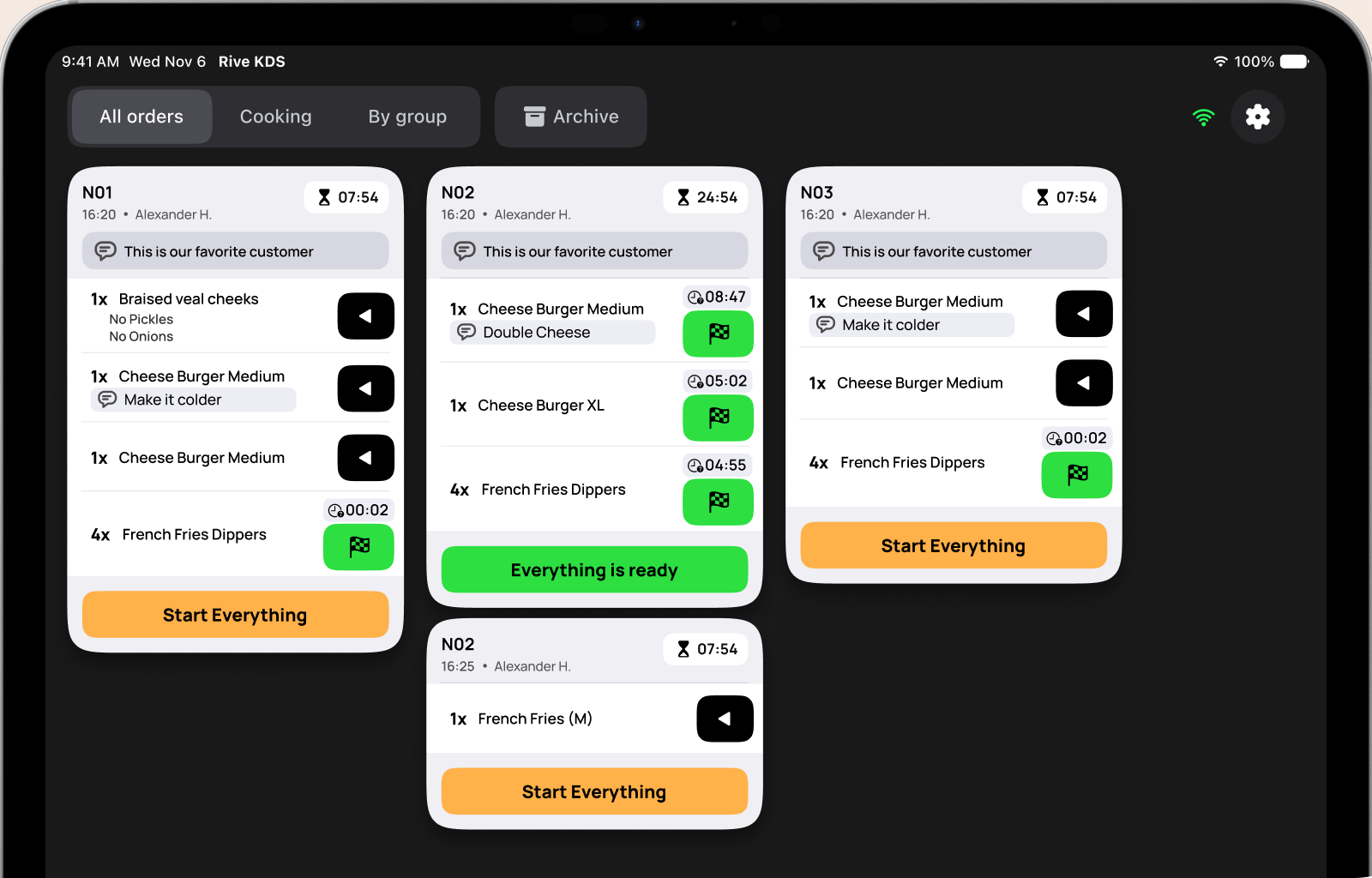
The Terminal and the kitchen screen talk to each other directly, so every step reaches the right person in about a second.
One tap on the Terminal sends every new dish to the kitchen screen, with its modifiers, notes and course.
Cooks tap play to start a dish and the flag to finish it. Every dish keeps its own timer, so nothing waits unnoticed.
The moment a dish is done, the waiter’s Terminal shows it with a sound, and can keep reminding until someone picks it up.
Start a dish, finish it, then send a new order from the Terminal. This is the real Rive flow, running right here in your browser.

Built with kitchens, for the pace of a real service.
See every ticket, only what’s cooking, dishes grouped by menu category for each station, or search the day’s finished orders in Archive.
Each dish records when it started and finished, so the pass sees what’s running late at a glance.
Modifiers and comments travel with each dish, and order notes sit on top of the ticket where no one can miss them.
Waiters get a ready alert with sound. Turn on repeats every 30 seconds, 1 minute or 3 minutes until someone confirms it.
Out of an ingredient? Long‑press the dish to reject it with a comment, and the waiter knows before the guest waits for nothing.
The Terminal and the kitchen screen talk over your own Wi‑Fi with Rive Connect. If the internet drops mid‑service, tickets keep flowing and everything syncs when you’re back online.
Finished tickets move to a searchable archive and clear out after 24 to 72 hours. You choose how long.
No accounts or passwords on the kitchen tablet. Just scan a code from the Terminal.
Kitchen Display is an add-on for every Rive plan, priced per screen. Start with one tablet at the pass and add screens as the kitchen grows.
 Kitchen questions
No. The Terminal and the kitchen screen connect over your venue’s Wi‑Fi with Rive Connect. If the internet drops, orders still reach the kitchen and ready alerts still reach the Terminal. Rive syncs everything once you’re back online.
Any iPad or Android tablet that runs Rive KDS in landscape. Larger screens show more tickets side by side: the board picks two, three or four columns to fit.
Yes. Pair as many screens as your kitchen needs. Each one can be switched off on its own from the Terminal’s Devices page without losing its pairing.
Long‑press the dish, choose whether its ingredients are written off, and add a short comment. The waiter’s Terminal shows the rejection right away.
Yes. Rive can also print kitchen tickets on a network printer, so you can use screens, paper, or both while you switch over.
Kitchen Display is an add-on to any Rive plan, priced per screen. Talk to our team and we’ll put together a setup for your kitchen.
Start on the tablet you already have. Pair it in two minutes and run your next service without a single paper ticket.
 04:12
04:12

 No onions
